


Defalto CRM 1.10 Released
Smarter workflows, better filters and Sales Funnel
Defalto CRM 1.10 improves workflow conditions, List View filtering, automation tracking and adds Sales Funnel as a free extension installable through the Defalto Installer.
Main highlights in Defalto CRM 1.10
Version 1.10 focuses on more reliable automation, clearer filters, better dashboard behavior and visual sales pipeline management.
Workflow conditions
Advanced workflow conditions now support clearer AND and OR logic between conditions and groups.
List View filters
New filtering behavior makes it easier to build conditions directly in record lists.
Sales Funnel
Sales Funnel gives teams a visual view of opportunities by sales stage and is installed through the Installer.
Improved workflow conditions
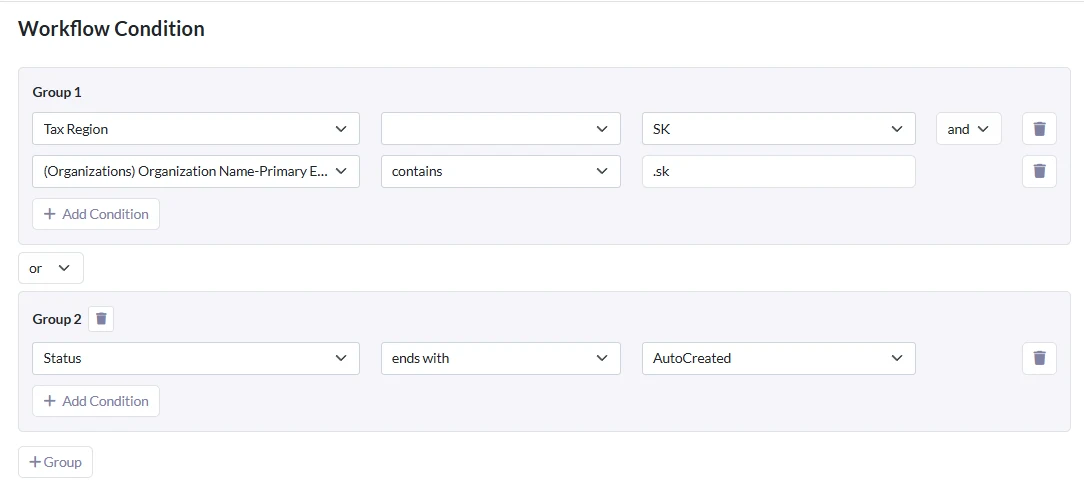
The main improvement in Defalto CRM 1.10 is a stronger workflow condition builder. Administrators can create more accurate automation rules with better condition grouping and more predictable evaluation.
AND and OR condition groups
Workflow conditions now use shared condition templates and support better grouping logic. This helps build more advanced rules without losing clarity.
- AND and OR logic between conditions
- AND and OR logic between condition groups
- Shared templates for lists and workflows
- Workflow specific operators and rules
- Fixed empty workflow fields
- Improved cron and after save evaluation
Set or changed values
New conditions were added for values that are set during record creation or changed later. This makes workflow behavior more predictable.
- Was set or changed
- Was set or changed to
- Was set or changed from
- Support for null values
- Support for zero values
- Unsupported creation conditions are blocked
Workflow reliability improvements
Defalto CRM 1.10 includes several workflow fixes that improve multilingual setups, related record handling and scheduled workflow behavior.
Better picklist and group handling
Workflow conditions now store original picklist values instead of translated labels. Groups and users with encoded or accented names are handled more safely.
- Original picklist values stored in workflow conditions
- Better behavior in multilingual CRM installations
- Group names with diacritics handled correctly
- HTML encoded group and user names decoded
- Editor no longer fails on missing owner lookup
- Assignment by ID, expression or source field preserved
More reliable actions
Workflow actions now better preserve value types, support related owner fields and include a delete action for recycle bin or permanent deletion.
- New delete workflow action
- Move to recycle bin or permanent delete
- Related record owner field selection
- Email fields keep source field value type
- Expressions with quotes load correctly
- Scheduled workflow time drift reduced
New List View filtering design
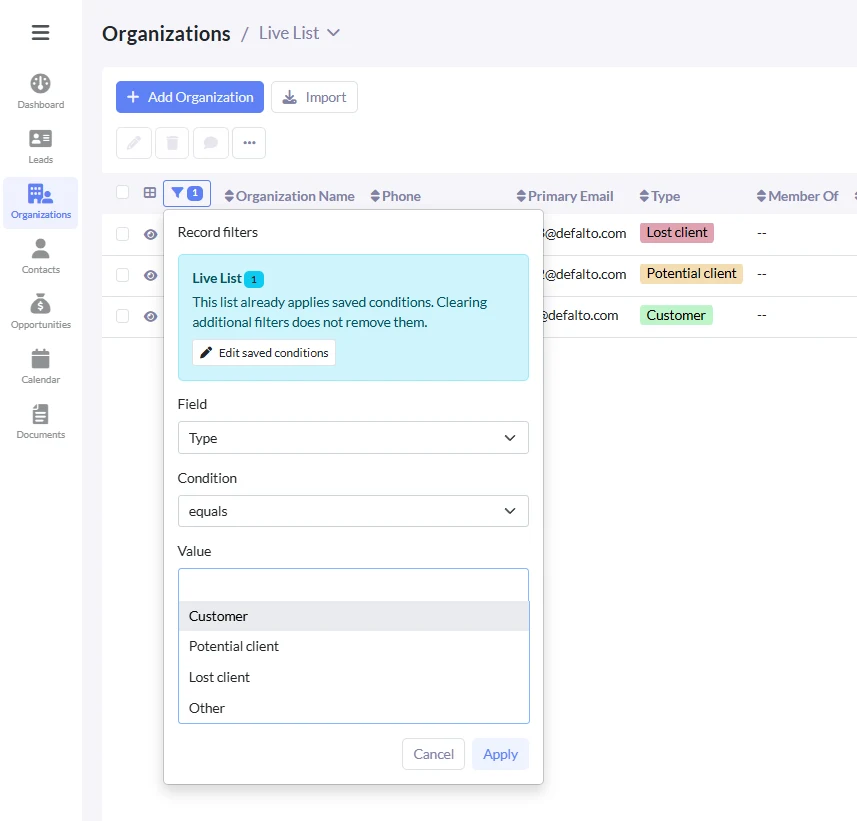
Defalto CRM 1.10 introduces a newer filtering approach for List View. The goal is to reduce clicks and make filtering records more direct.
Faster condition building
Users can build conditions directly in List View and the list can update after adding conditions. The filtering experience was checked across multiple field types.
- Assigned To fields
- Picklist and multi picklist fields
- Text, email, phone and URL fields
- Number, percent and currency fields
- Date, date time and time fields
- Reference fields and special selections
Aligned with saved filters
Date and field filter options were aligned with Custom View behavior, so filters can be reused more consistently.
- Date filters aligned with Custom View options
- Relative periods checked
- Current week, month and year style conditions
- Between conditions reviewed
- One initial condition prefilled
- Related module fields supported
Workflow history and scheduled workflow improvements
Workflow based changes are now easier to understand. Scheduled workflow timing was also improved to avoid drifting away from the intended schedule.
Better ModTracker visibility
Changes made by workflows can be written with better context, including workflow and task details for administrators.
- Normal saves keep correct user history
- Workflow changes can show workflow source
- Scheduled and delayed workflows reviewed
- Multiple workflows changing same field checked
- Open workflow and open task links for admins
- Regular users do not see admin details
Less schedule drift
Scheduled workflows can calculate the next trigger time from the original planned time, instead of slowly moving forward based on processing duration.
- Next trigger based on original schedule
- Better hourly workflow behavior
- Long running actions no longer shift the plan as easily
- More predictable scheduled automation
- Useful for email or bulk scheduled actions
- Better workflow timing stability
Sales Funnel free extension via Installer
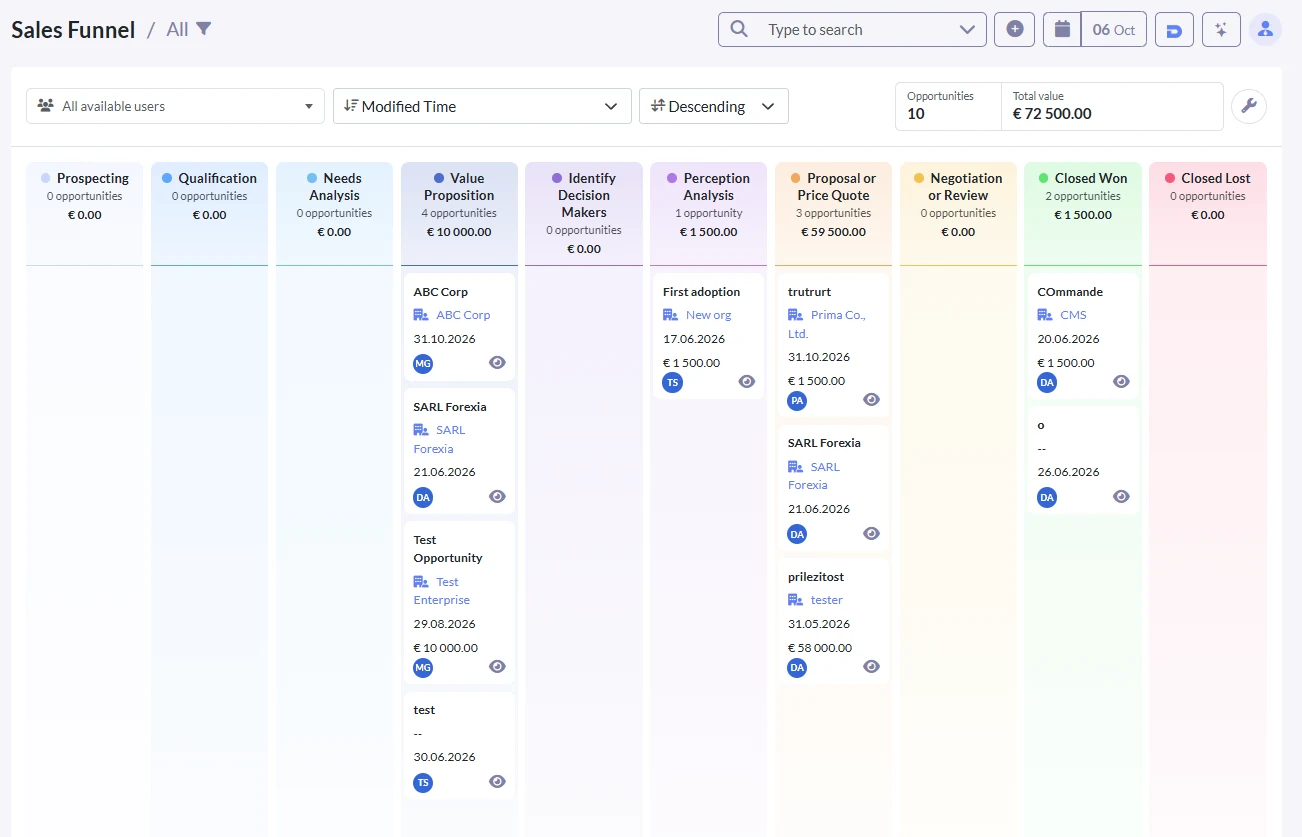
Defalto CRM 1.10 also introduces Sales Funnel as a free extension installable through the Defalto Installer. Sales Funnel gives sales teams a visual pipeline for opportunities.
Visual sales pipeline
Sales Funnel displays opportunities as cards organized by sales stage. Users can review the pipeline, focus on selected owners and move opportunities forward.
- Visual board for Opportunities
- Columns based on sales stages
- Cards based on existing opportunities
- Owner filter for users and groups
- Sorting by key opportunity fields
- Quick preview from the board
Move deals forward
Moving a card updates the real opportunity sales stage. The board respects permissions, visible stages, selected lists and owner filters.
- Move opportunities to later stages
- Stage counts and total values
- Values shown in user currency
- Configurable visible stages
- Configurable card fields per stage
- Administrator funnel settings
More improvements in Defalto CRM 1.10
This release also includes dashboard, installer, Kanban and Organization Price Book fixes.
Dashboard layout
Dashboard widget positions, sizes and tab specific layouts now remain saved after refresh.
Installer checks
Installer behavior was reviewed for membership activation, extension download and update visibility.
Kanban and Price Book fixes
Kanban now handles empty colors safely, and the Organization Price Book field can be edited again.
Previous release: Defalto CRM 1.9
Defalto CRM 1.10 builds on the previous release, which focused on Drag and Drop files, Summary Widgets and Quick Search. Version 1.10 continues by strengthening workflow automation and filtering.
Defalto CRM for open source and small business teams
Defalto CRM is built for companies that need customer management, automation, reporting, search and a path to grow with Membership and extensions.
Open Source CRM
Learn more about Defalto CRM as an open source CRM option for companies that want flexibility and control.
Open Source CRMCRM for Small Business
See how Defalto CRM can help small businesses manage customers, sales, support and everyday communication.
CRM for Small BusinessTrial hosting
Try Defalto CRM with hosted setup and test the system before choosing your final CRM plan.
Start TrialMembership and extensions
Defalto CRM can be extended with Membership and extension packages depending on your business needs.
Defalto Membership
Membership helps keep Defalto CRM updated and supported. It can also provide access to Membership based benefits and AI related features depending on the selected setup.
- Regular updates and support
- Access to Membership benefits
- Better long term CRM maintenance
- Support for growing Defalto CRM installations
Defalto extensions
Extension packages add more functionality for documents, automation, reporting, security, customer processes and other business needs.
- Add selected CRM extensions
- Improve business workflows
- Extend documents and automation
- Choose a package based on your needs
Try Defalto CRM and test the new improvements
Start with hosted trial setup and see how Defalto CRM can help your team automate work, filter records faster and manage opportunities visually.
Start TrialFrequently asked questions
Answers about Defalto CRM 1.10, workflow automation, filters, dashboard improvements and Sales Funnel.
What is new in Defalto CRM 1.10?
Defalto CRM 1.10 improves workflow conditions, List View filtering, workflow tracking, scheduled workflows, dashboard layouts and adds Sales Funnel as a free extension.
Does Defalto CRM 1.10 improve workflows?
Yes. It improves workflow conditions, multilingual picklist handling, delete actions, owner fields, email fields, scheduled timing and workflow history.
What is Sales Funnel in Defalto CRM?
Sales Funnel is a visual board for opportunities. It shows sales stages as columns and opportunities as cards, with filtering, sorting, preview and forward stage movement.
How is Sales Funnel installed?
Sales Funnel is distributed as a free extension and can be installed through the Defalto Installer.
Does Defalto CRM 1.10 improve List View filters?
Yes. List View filtering was redesigned to make condition building faster and to align options with Custom View behavior.
How does this release relate to Defalto CRM 1.9?
Defalto CRM 1.9 focused on file upload, Summary Widgets and Quick Search. Defalto CRM 1.10 strengthens automation, filters and visual sales pipeline management.