


Defalto CRM 1.9 Released
Drag and Drop files, Summary Widgets and Quick Search
Defalto CRM 1.9 improves daily CRM work with faster document upload, dynamic Summary View widgets and enhanced Quick Search directly in the core system.
Main highlights in Defalto CRM 1.9
Version 1.9 focuses on faster file handling, better record summaries and more precise search.
Drag and Drop files
Users can upload documents faster and keep files connected to the correct CRM record.
Summary Widgets
Related information can be shown directly in Summary View with cleaner empty states.
Quick Search
The top search area now supports module selection, icons, filters and cleaner results.
Drag and Drop files in Defalto CRM
The first main feature in Defalto CRM 1.9 is Drag and Drop file upload. Users can attach documents faster from the places where they already work.
Faster file handling
Drag and Drop file upload is now part of the Defalto CRM core. It helps users upload contracts, customer documents, support files and project materials without unnecessary navigation.
- Upload from the Documents module
- Upload from Quick Create
- Upload from related Documents lists
- Upload from Summary View document widgets
- Automatic relation to the current CRM record
- Defalto styled upload modal
Built into the standard system
The Drag and Drop module was adapted for Defalto CRM, including layout, responsive modal behavior, icons, scripts, styles, PHP classes and translations.
- Core Defalto CRM integration
- Responsive modal design
- Updated document buttons
- Font Awesome icon support
- Automatic installation support
- Cleaner upload workflow
Summary Widgets in Summary View
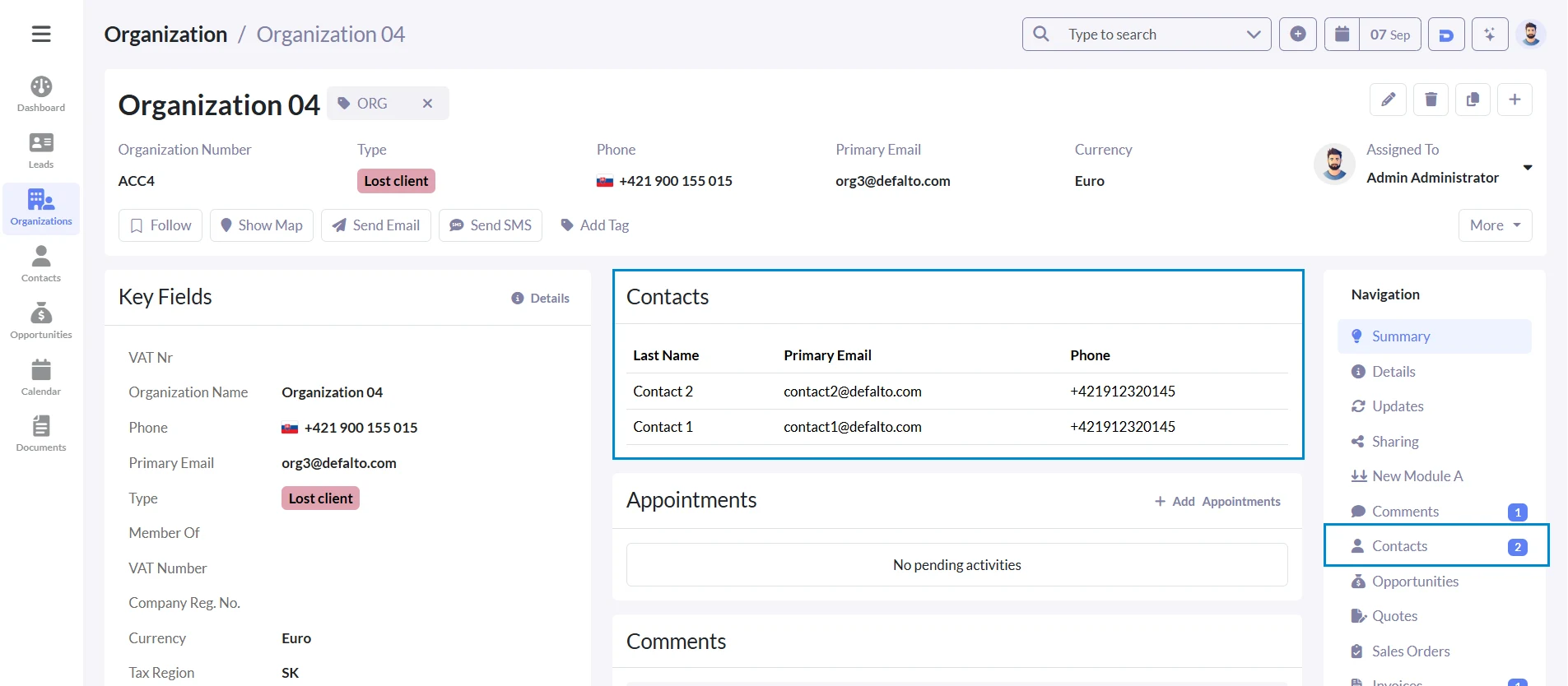
The second main feature in Defalto CRM 1.9 is Summary Widgets in Summary View. They help users see related CRM information directly on a record.
Related data on the record
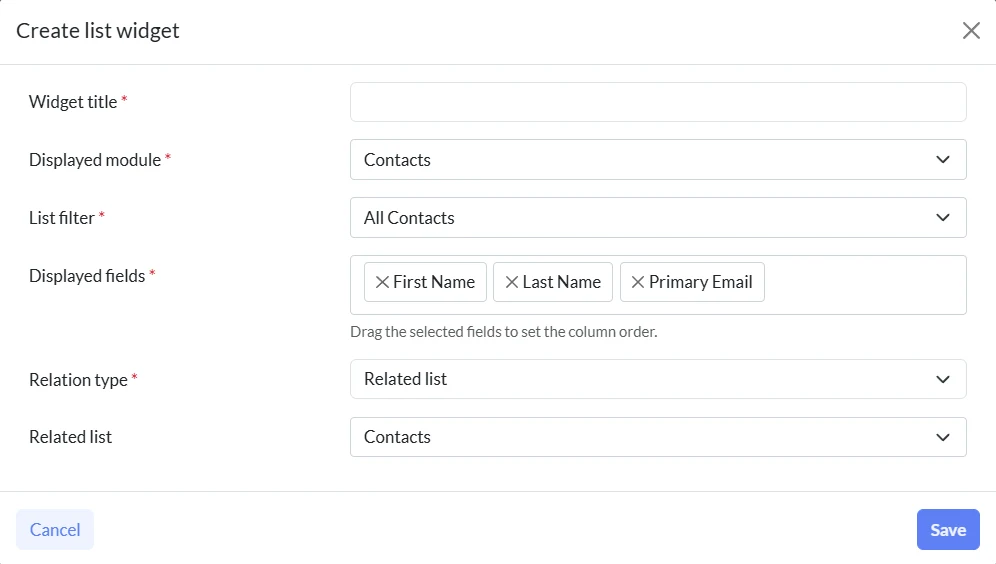
Summary View can now display configured widgets for related data such as documents, tasks, milestones, tickets, contacts, products, comments, appointments and updates.
- Widget selection through settings
- Unified empty widget design
- Cleaner Appointments empty state
- Cleaner Comments empty state
- Unified Updates and dynamic lists
- Shared empty state template
Improved query foundation
Related list widgets now use improved Core Query Generator logic with parameterized conditions and safer handling when related records do not exist.
- Parameterized widget conditions
- Filtering by reference database value
- Filtering by related record ID list
- Shared SQL and parameter handling
- Safer empty related lists
- Unit test for SQL generation
Quick Search in the Defalto CRM core
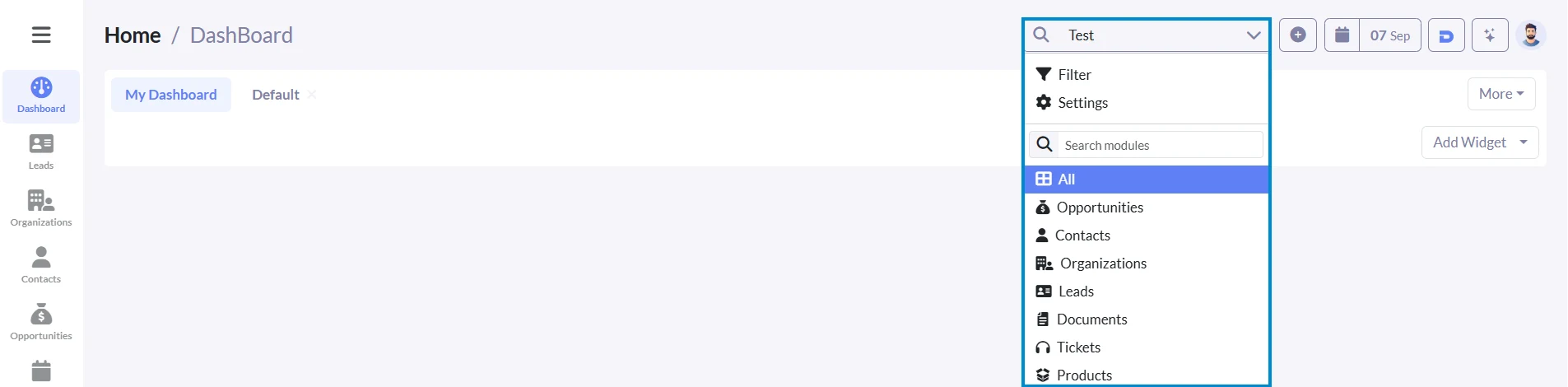
Quick Search is now part of the core Defalto CRM system. It improves the top search area with module selection, icons, filters and cleaner search results.
Search where it matters
Users can search across all supported modules or limit search to one selected module. This makes CRM search faster and more focused.
- Module dropdown next to the search field
- Search across all modules or one module
- Selected module shown as an icon
- Search by technical and translated module names
- Only active searchable modules are shown
- Technical modules are hidden from search
Better filters and pagination
Quick Search is connected with the advanced filter window and uses cleaner OR conditions, active filter handling and standard pagination.
- Selected module prefilled in filter window
- Filter opens without empty conditions
- OR conditions for real search fields
- Active filter conditions passed to results
- Standard list style pagination
- Separate TopbarSearch template
Improved Reports for Defalto CRM
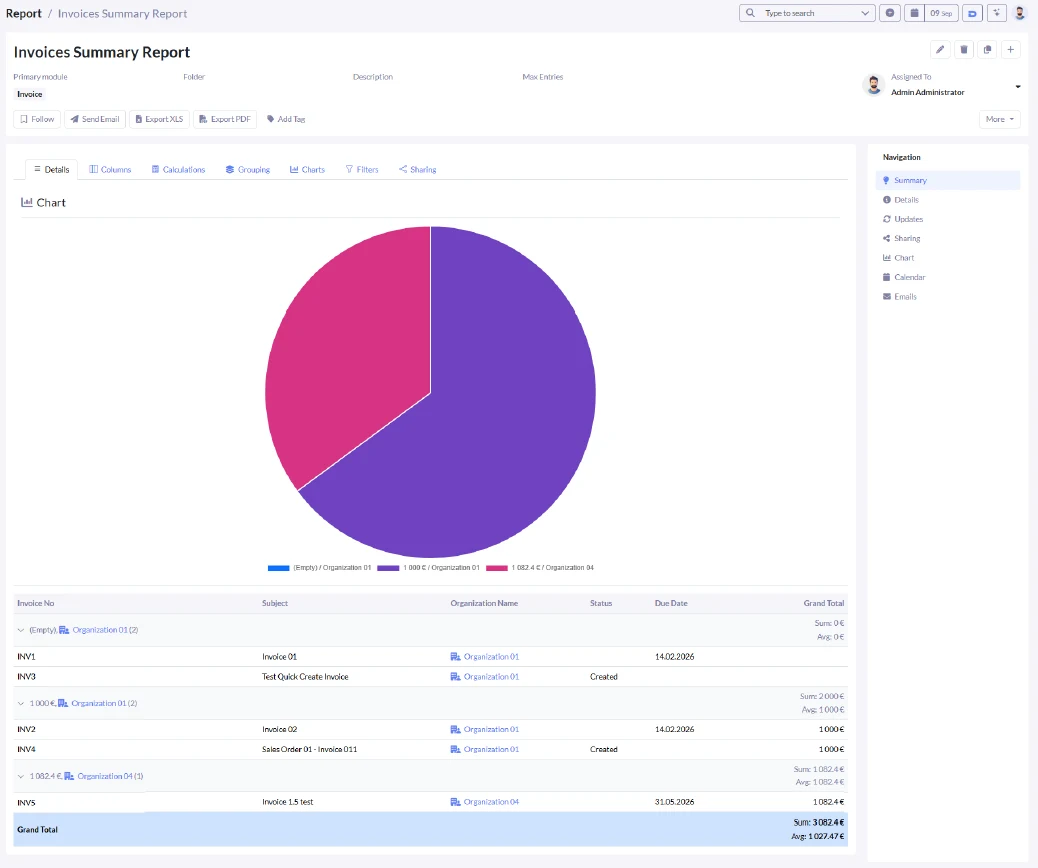
Defalto CRM 1.9 also improves reporting with stronger summary reports, date grouping, chart configuration and better default report setup.
Summary reports and grouping
Reports can group data by fields that do not need to be visible as output columns. This makes compact summary reports easier to build.
- Grouping by hidden output fields
- Date grouping by day, week, month, quarter or year
- Chronological sorting of date groups
- Reports with grouping only
- Record Count for table, groups, total and export
- Default columns loaded from the All view
Better chart configuration
Charts use grouping for the X axis and selected calculations for the Y axis. They can be displayed in preview, detail and PDF output.
- X axis based on grouping
- Y axis based on count, sum, average, minimum or maximum
- Chart position above or below the table
- Charts in edit preview, detail and PDF
- Bar, line, pie and doughnut chart support
- Last X periods date filter
More improvements in Defalto CRM 1.9
This release also improves Installer license checks, widget stability, search configuration and report translations.
Installer license handling
Installer can validate a license with user limits and load available modules from license data.
Safer widget queries
Related list widgets use improved query logic with safer parameter handling.
Cleaner templates
Top bar search was moved to a separate template for easier maintenance.
Previous release: Defalto CRM 1.8
Defalto CRM 1.9 builds on the previous release, where the main focus was Two Factor Authentication and Reports for Defalto CRM. Version 1.9 continues with practical daily productivity improvements.
Defalto CRM for open source and small business teams
Defalto CRM is built for companies that need customer management, document handling, search, reporting and a path to grow with Membership and extensions.
Open Source CRM
Learn more about Defalto CRM as an open source CRM option for companies that want flexibility and control.
Open Source CRMCRM for Small Business
See how Defalto CRM can help small businesses manage customers, sales, support and everyday communication.
CRM for Small BusinessTrial hosting
Try Defalto CRM with hosted setup and test the system before choosing your final CRM plan.
Start TrialMembership and extensions
Defalto CRM can be extended with Membership and optional extensions depending on your business needs.
Defalto Membership
Membership helps keep Defalto CRM updated and supported. It can also provide access to Membership based benefits and AI related features depending on the selected setup.
- Regular updates and support
- Access to Membership benefits
- Better long term CRM maintenance
- Support for growing Defalto CRM installations
Defalto extensions
Defalto extensions add more functionality for documents, automation, reporting, security, customer processes and other business needs.
- Add selected CRM extensions
- Improve business workflows
- Extend documents and automation
- Choose extensions based on your needs
Try Defalto CRM and test the new improvements
Start with hosted trial setup and see how Defalto CRM can help your team upload files, review record summaries, search faster and analyze reports.
Start TrialFrequently asked questions
Answers about Defalto CRM 1.9, Drag and Drop files, Summary Widgets, Quick Search and reporting.
What is new in Defalto CRM 1.9?
Defalto CRM 1.9 adds Drag and Drop files, Summary Widgets in Summary View and Quick Search in the core CRM system. It also improves Reports and Installer license handling.
Does Defalto CRM 1.9 include Drag and Drop file upload?
Yes. Drag and Drop file upload is part of the core Defalto CRM experience and helps users upload documents faster from records, related lists and widgets.
What are Summary Widgets in Summary View?
Summary Widgets display related CRM information directly on a record. They can show documents, tasks, tickets, comments, appointments and other related data.
What is Quick Search in Defalto CRM?
Quick Search is the enhanced top bar search with module selection, module icons, advanced filter integration and cleaner search results.
Does Defalto CRM 1.9 improve Reports?
Yes. Reports support stronger summary reporting, date grouping, chart configuration, Last X periods filters and default columns from the All view.
How does this release relate to Defalto CRM 1.8?
Defalto CRM 1.8 focused on Two Factor Authentication and Reports. Defalto CRM 1.9 continues with daily productivity improvements such as file upload, Summary Widgets and Quick Search.